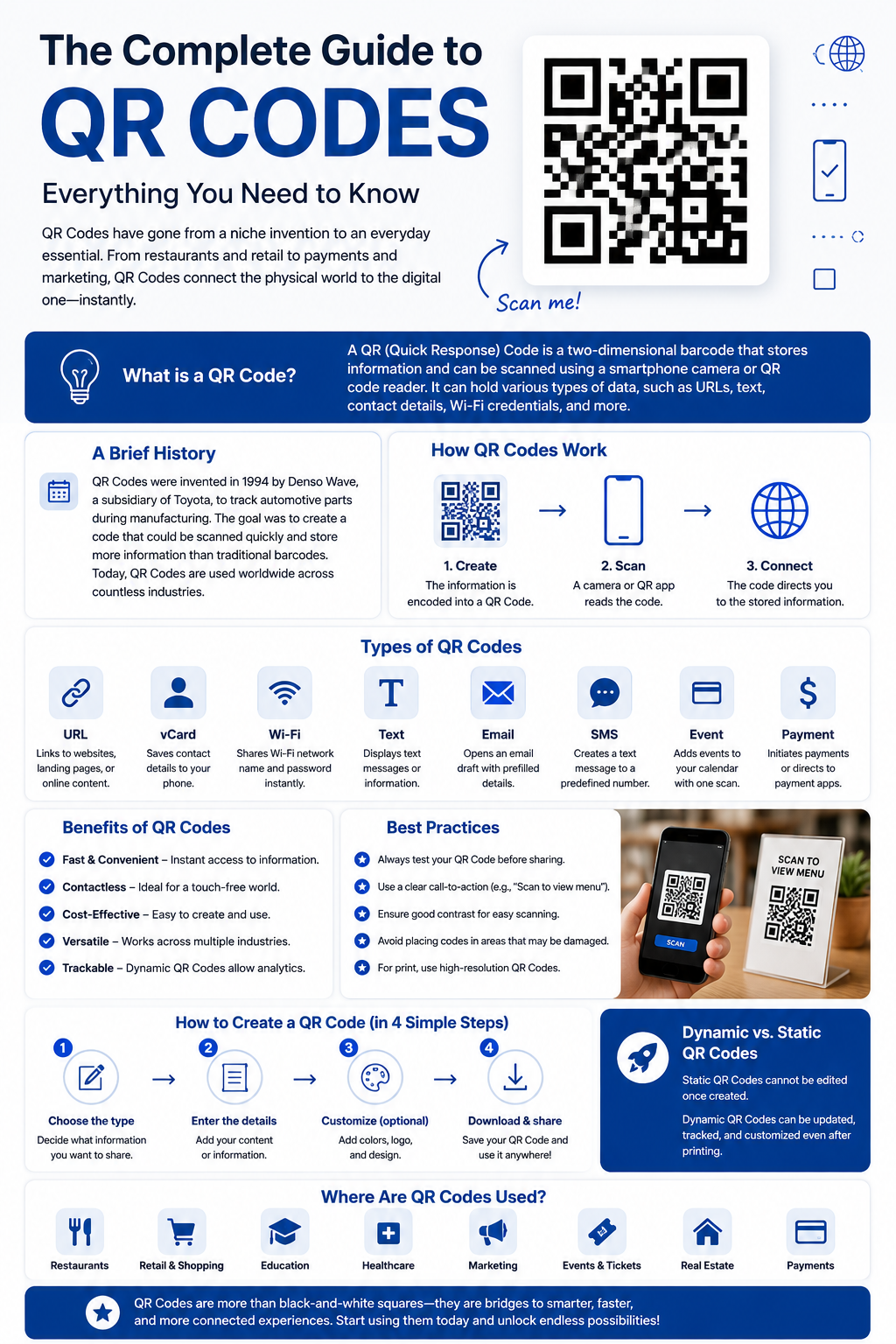
The Complete Guide to QR Codes: Everything You Need to Know
Introduction
QR Codes have become an essential part of our daily lives. Whether you are making a digital payment, opening a restaurant menu, connecting to Wi-Fi, downloading an app, or sharing contact information, chances are you have scanned a QR Code. These square-shaped barcodes provide a fast, convenient, and secure way to access information using a smartphone or other smart device.
Over the past few years, QR Codes have gained worldwide popularity because they simplify many everyday tasks. Businesses use them for marketing campaigns, educational institutions use them for sharing learning resources, and individuals use them to exchange contact details or links instantly. With just one scan, users can access websites, videos, documents, social media profiles, payment gateways, and much more.
This comprehensive guide explains what QR Codes are, how they work, their history, benefits, different types, business applications, security considerations, and best practices for creating effective QR Codes.
What Is a QR Code?
A QR Code, short for Quick Response Code, is a two-dimensional barcode designed to store information in a machine-readable format. Unlike traditional barcodes that only store limited information horizontally, QR Codes store data both horizontally and vertically, allowing them to hold much more information.
A QR Code can contain:
- Website URLs
- Contact information
- Phone numbers
- Email addresses
- SMS messages
- Wi-Fi credentials
- Payment links
- Text
- PDF files
- Videos
- App download links
- Social media profiles
- Location coordinates
Users simply open their smartphone camera or a QR scanning app, point it toward the code, and instantly access the stored information.
History of QR Codes
QR Codes were invented in 1994 by the Japanese company Denso Wave, a subsidiary of Toyota. Initially, they were developed to improve manufacturing efficiency by tracking automotive parts.
Traditional barcodes had limitations because they could only store small amounts of data. Denso Wave created QR Codes to solve this problem by enabling greater storage capacity and faster scanning.
Although QR Codes were originally designed for industrial use, they gradually expanded into many other industries, including:
- Retail
- Healthcare
- Education
- Banking
- Hospitality
- Marketing
- Transportation
- Government services
Today, billions of QR Code scans occur every year across the world.
How QR Codes Work
A QR Code contains black squares arranged on a white background in a specific pattern. These patterns encode digital information.
When someone scans a QR Code:
- The smartphone camera detects the QR pattern.
- The scanning software decodes the stored data.
- The information is processed.
- The linked action is performed automatically.
For example:
- Opening a website
- Connecting to Wi-Fi
- Calling a phone number
- Saving a contact
- Opening Google Maps
- Downloading a document
This entire process usually takes less than a second.
Main Components of a QR Code
Every QR Code contains several important elements.
Position Markers
The three large squares located at the corners help scanners detect the orientation of the code.
Alignment Pattern
This ensures accurate scanning even when the QR Code is printed on curved surfaces.
Timing Pattern
These alternating black and white modules help determine the size of the data grid.
Data Area
This section stores the actual encoded information.
Quiet Zone
The white border surrounding the QR Code helps scanners distinguish it from nearby objects.
Types of QR Codes
There are two major categories of QR Codes.
Static QR Codes
Static QR Codes contain fixed information that cannot be edited after creation.
Examples include:
- Website links
- Plain text
- Phone numbers
- Email addresses
Advantages:
- Free to create
- Permanent
- Simple
- No maintenance required
Disadvantages:
- Cannot be updated
- No scan tracking
- Limited flexibility
Dynamic QR Codes
Dynamic QR Codes contain a short redirect link rather than storing all the information directly.
Advantages include:
- Editable after creation
- Scan analytics
- Device tracking
- Geographic insights
- Campaign management
- Better marketing performance
Businesses generally prefer Dynamic QR Codes because they provide greater flexibility.
Benefits of Using QR Codes
Instant Access
Users can reach digital content within seconds.
Contactless Experience
QR Codes eliminate the need for physical contact, making them ideal for restaurants, hospitals, and retail stores.
Easy Sharing
Large amounts of information can be shared without typing long URLs.
Cost-Effective
Printing QR Codes is inexpensive, making them suitable for businesses of all sizes.
High Storage Capacity
QR Codes store significantly more information than traditional barcodes.
Fast Scanning
Modern smartphones scan QR Codes almost instantly.
Marketing Opportunities
Businesses use QR Codes to increase customer engagement and track campaign performance.
Common Uses of QR Codes
QR Codes are widely used in many industries.
Business Marketing
Companies place QR Codes on:
- Business cards
- Flyers
- Posters
- Product packaging
- Billboards
- Newspapers
- Catalogs
Customers can instantly visit websites or promotional pages.
Restaurants
Digital menus have become increasingly popular. Customers scan a QR Code to view the menu on their phones without requiring printed copies.
Digital Payments
Many payment services allow customers to scan QR Codes to complete secure transactions quickly.
Education
Teachers use QR Codes to share:
- Study materials
- Assignment links
- Video lectures
- Online quizzes
- Classroom resources
This makes learning more accessible and interactive.